Editing the Workpiece
To indicate that we are modeling a multi-layer cylindrical workpiece, increase
the value of the spin-edit control to four. Notice that once the workpiece has
more than one region (our problem has four), the geometry changes from free-space to planar or
cylindrical. Choose "Cylindrical," and specify the parameters according to the original problem
statement. Your screen will appear as shown below.
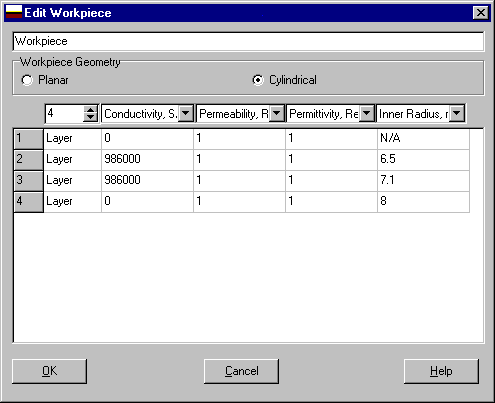
The third layer, extending from 7.1mm to 8mm, is introduced solely to accomodate the flaw.
VIC-3D® insists that all flaws be anchored to the shallowest boundary of a region. In other
words, a flaw can't "float" within a region. Click "OK" to accept your edits and continue to
define the rest of the problem.
Next|
Beginning